Connecting an AI agent (MCP)
MCP (Model Context Protocol) is a standard way for AI assistants to connect to other services. With MCP, the assistant you use (for example Claude Code) can read your financial summary and, if you allow it, record new transactions in Vaulty.
Available on the Personal plan and above.
1. Create an access token
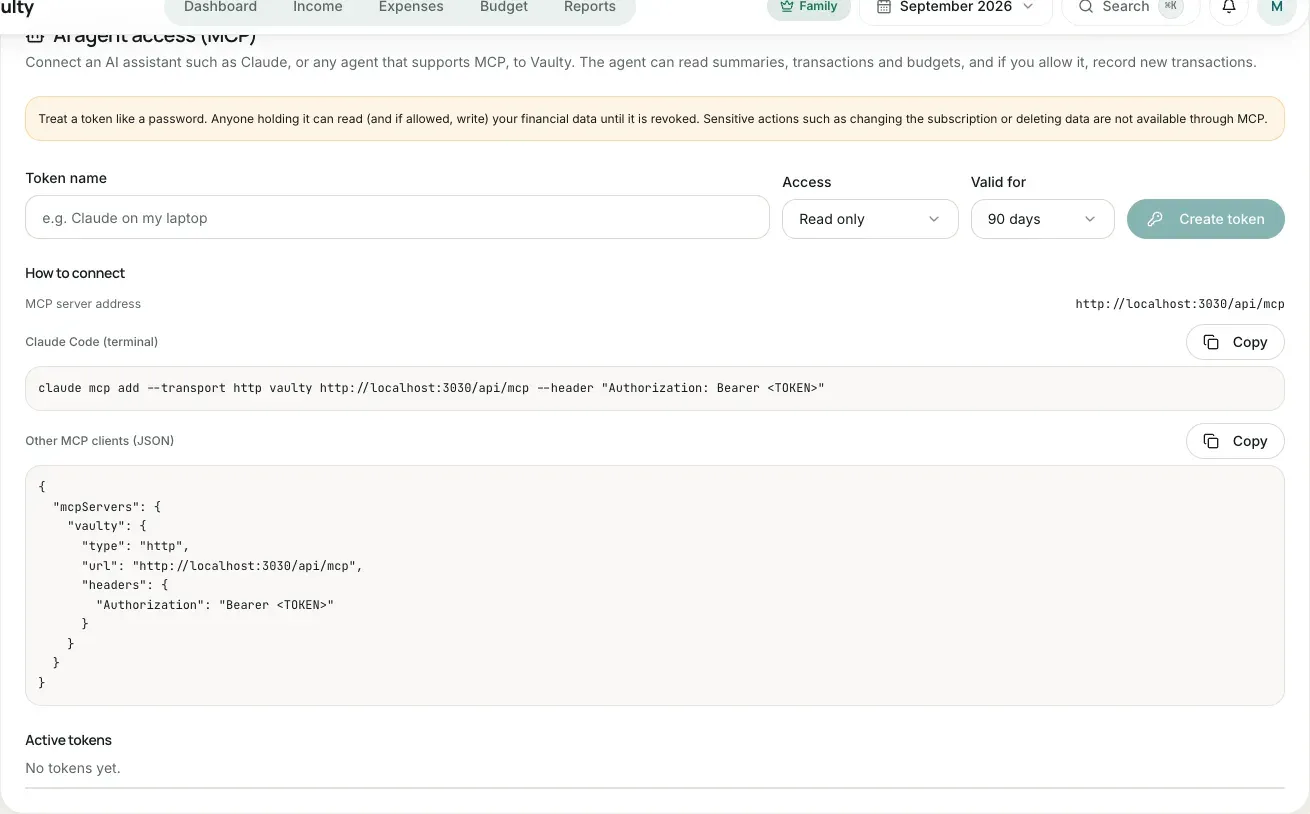
Section titled “1. Create an access token”- Open Settings > AI agent access (MCP). Only the organization owner can manage tokens.
- Enter a token name (for example “Claude on my laptop”).
- Choose the access: Read only, or Read and record transactions.
- Choose the validity: 30 days, 90 days, 1 year, or no expiry.
- Click Create token, then copy the token now. It is shown only once.
2. Connect it to your agent
Section titled “2. Connect it to your agent”MCP server address: https://<your-vaulty-app-address>/api/mcp. The settings page shows the correct address with ready-to-copy examples.
Claude Code
Section titled “Claude Code”claude mcp add --transport http vaulty https://<your-vaulty-app-address>/api/mcp \ --header "Authorization: Bearer <TOKEN>"Other MCP clients (JSON)
Section titled “Other MCP clients (JSON)”{ "mcpServers": { "vaulty": { "type": "http", "url": "https://<your-vaulty-app-address>/api/mcp", "headers": { "Authorization": "Bearer <TOKEN>" } } }}3. Try it
Section titled “3. Try it”Ask your agent, for example:
- “What is my total spending this month, and which category is the largest?”
- “Which budgets have I gone over?”
- “Record a coffee expense of Rp 25,000 in the Food category.”
For the last request the token needs write access. The agent will first fetch the category list so the category and payment method match.
Limits and security
Section titled “Limits and security”- The agent can only add transactions. There is no editing or deleting, and no sensitive actions such as changing the subscription or inviting members.
- At most 60 requests per minute per token and 10 active tokens per organization.
- Every call is checked again: the token is not revoked or expired, its creator is still a member of the organization, and the plan still includes MCP.
- Everything recorded through MCP is written to the activity log with the token name.
- Downgrading to Free closes MCP access. Tokens are not deleted and work again when you upgrade.
See the tools reference for each tool’s parameters.
What it looks like in the app
Section titled “What it looks like in the app”